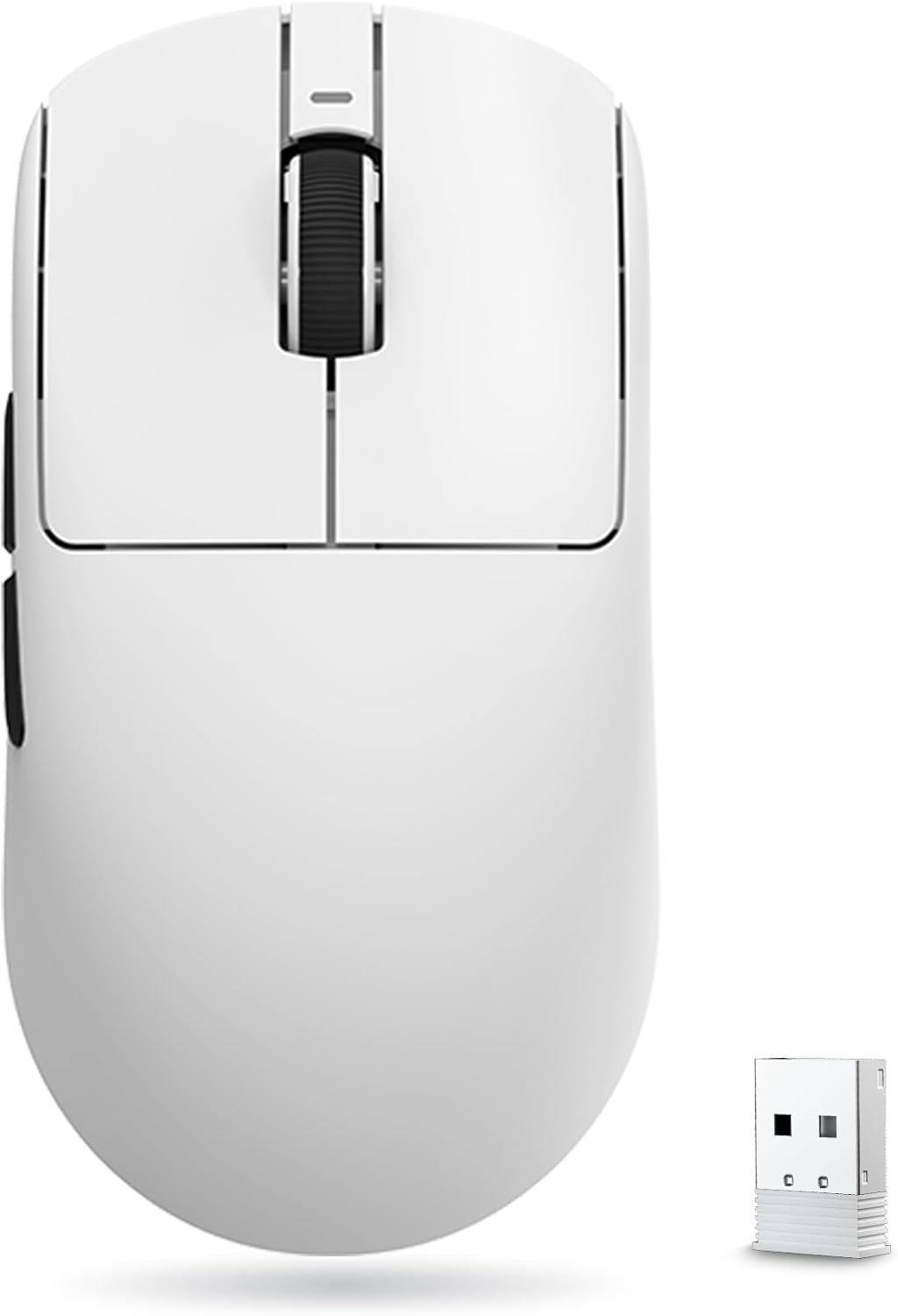
VXE
VXE R1 Pro Review
Excellent
$49.02
The best pure value in lightweight wireless gaming mice: flagship PAW3395 performance, a 48-gram shell, and RTINGS-verified elite latency for around $35. Early-batch QC wobble and a small minority of scroll-wheel failures are the only real hesitations. Buy it for competitive FPS on a budget. 8.8/10
As an Amazon Associate we earn from qualifying purchases made through links for VXE R1 Pro.
Sensor
PixArt PAW3395, up to 26,000 DPI, 650 IPS, 50G
Weight
48g advertised (48.8g RTINGS / 49.5g Can Buy or Not measured)
Dimensions
120.6 x 64.1 x 37.6 mm
Shape
Symmetrical, medium-low profile
Pros & Cons
Pros
- Flagship PAW3395 sensor at a budget price
- 48g ultralight shell with smooth ice-feel coating
- Remarkably low click and sensor latency (RTINGS-verified)
- 75-hour battery life; charges to full in ~15 minutes
- Optional 4K polling with separate dongle
- Free browser-based software, no install required
- In-box grip tape and spare PTFE skates
Cons
- No Bluetooth — 2.4GHz and wired only
- Reliability split: a minority report scroll-wheel or button failures within weeks
- 4000Hz polling requires a separate dongle purchase
- Mechanical switches less durable than optical rivals
- One-year warranty vs. two years from bigger brands
- Ice-feel coating shows fingerprints on lighter colors
Overview
The VXE R1 Pro, sold in North America under the ATK Gaming Gears banner as the ATK VXE Dragonfly R1 Pro, has become one of the most talked-about budget mice in the enthusiast community, and for good reason. It packs the same PixArt PAW3395 flagship sensor found in mice costing three times as much into a 48-gram wireless shell that routinely sells for around $35, 50. It is the mouse that turned "just buy a Chinese ultralight" into the mainstream answer to the perennial question of what to get for competitive FPS on a budget. On Amazon it holds a 4.5-out-of-5 rating across 171 reviews with an Amazon's Choice badge and sustained sales of 500+ units a month, numbers that reflect a genuinely high satisfaction rate for a value-tier product, not just hype.
VXE is the gaming sub-brand of ATK Gear, part of the same ATK/VGN/VXE umbrella that has spent the last few years systematically undercutting Western peripheral brands on spec-for-spec value. The R1 Pro sits in the middle of the Dragonfly R1 family, above the base R1, SE+, and NearLink variants with their cut-down PAW3395 SE sensor, below the 54-gram Pro Max with its double-capacity battery. All five models share the same symmetrical shell; the Pro is where you get the full-fat 3395, the ice-feel coating, and 4000Hz polling support with an optional dongle. There is a meaningful difference between the Pro and the cheaper variants: RTINGS notes that lower-priced models use a 3395 SE sensor that community reports suggest is a rebranded PixArt 3335, a flagship-class sensor from two generations ago, so the Pro is the entry point where the actual flagship tracking begins.
First impressions from the community are consistent: this is a mouse that feels like it costs twice its asking price. RTINGS, which bought and instrument-tested its own unit, calls it a remarkable FPS gaming mouse with outstanding raw performance and lists it among its recommended lightweight mice, including a "best cheap lightweight" nod in its 2026 roundups. The catch: and there is one, is that value-tier pricing brings value-tier quality control. A small but persistent minority of owners report scroll-wheel or button failures within weeks or months, and early production batches had documented cosmetic quirks. That reliability split is the single biggest thing to weigh before buying.
Build Quality and Design
The R1 Pro's headline number is its weight: 48g advertised, 48.8g on RTINGS' scale, 49.5g on a second reviewer's, either way, lighter than a Razer Viper V3 Pro (54g) or a Logitech G Pro X Superlight 2 (60g). It gets there without the drilled-out honeycomb holes of earlier ultralights; the shell is solid plastic with no cutouts, which keeps dust out and rigidity in. The shape is a symmetrical, medium-low profile at 120.6 x 64.1 x 37.6mm, with a hump set slightly to the rear and fairly flat sides, the same basic silhouette that made the Pulsar X2 a community favorite. RTINGS notes it suits palm, claw, and fingertip grips across a wide range of hand sizes, with a slight lean toward claw players who want rear-palm support. Long-term owners with fingertip and relaxed-claw grips consistently describe the fit as near-ideal for small-to-medium hands.
The ice-feel coating is one of the Pro's defining touches and a genuine differentiator at this price. Owners describe it as smooth and cool to the touch, and, usefully for sweaty-handed players, it becomes slightly grippier as your hands warm up. The flip side: it shows fingerprints and skin oil easily, particularly on the white model, and some Reddit users report reaching for the bundled grip tape in humid conditions. ATK includes a set of grip stickers in the box alongside spare PTFE feet and a USB-C cable, which conveniently covers the two most common aftermarket upgrades. The stock feet are another pleasant surprise, community feedback compares them favorably to aftermarket Corepad Pro and Tiger Arc sets out of the box, with a controlled glide that low-sensitivity players in particular seem to love.
Build quality is where opinions split. RTINGS found excellent build quality with no major flaws, and many long-term owners report zero issues, one r/MouseReview user with six months on an early pre-order unit called it one of the best mice for the price-to-quality ratio, and another says the R1 Pro Max pushed their far more expensive Finalmouse and Beast X mice into the drawer. But early production batches had documented quirks: reviewers flagged slight side-shell flex, a scroll wheel that rattles when shaken, and a left main button sitting marginally higher than the right. Community consensus is that later batches fixed most of this, owners of recent units report no side flex and level buttons, but it explains the lingering reputation for QC variance. There is also a minor flex around the sensor ring on the underside that RTINGS measured but says is unnoticeable in actual use, plus occasional reports of a creak near the thumb rest that appears after a couple of weeks; in at least one documented case it resolved on its own. None of these are deal-breakers, but they are why buying through a retailer with easy returns is the sensible play.
Key Features
- PixArt PAW3395 sensor, the same flagship optical sensor used in the Razer Viper V3 Pro and countless $100+ mice, here with up to 26,000 DPI and flawless tracking; the true 3395, not the cut-down SE variant used in cheaper R1 models
- 48-gram symmetrical shell, one of the lightest solid-shell wireless mice on the market at any price, with no honeycomb cutouts
- 1000Hz stock, 4000Hz capable, 1000Hz polling out of the box; a separately sold 4K dongle (roughly $20) unlocks 4000Hz wireless polling, and the mouse's Nordic MCU handles it cleanly after a firmware update
- 75-hour battery from a 250mAh cell, real-world reports of roughly a week of daily mixed work and gaming use, with fast charging that tops up from empty in about 15, 30 minutes
- Huano Ice Berry Pink Dot mechanical switches, firm, tactile main buttons that owners describe as satisfyingly heavy; some users find them stiffer than the optical switches on pricier rivals, so switch feel is a genuine preference point
- FSWITCH E10 scroll encoder, a crisp, light, mostly silent step feel that community reviewers rate well above the mushy wheels on comparably priced mice
- Ice-feel coating, smooth finish that gets grippier with sweat, plus bundled grip tape for those who want more purchase
- ATK Hub software, no install needed, full remapping, DPI steps, and firmware updates via a browser-based hub (hub.atk.pro); it defaults to Chinese but Chrome's built-in translate handles it fine, and Reddit users regularly note it beats Razer Synapse for simplicity
- Dual-mode 2.4GHz wireless + wired USB-C, no Bluetooth on the Pro (that is reserved for the SE+ and base models); the base of the mouse hides a dongle cavity, though the cover is a flimsy friction-fit piece rather than the magnetic hatch on pricier mice
Full Specifications
| Specification | Detail |
|---|---|
| Sensor | PixArt PAW3395 (up to 26,000 DPI, 650 IPS, 50G) |
| Weight | 48g advertised; 48.8g (RTINGS) / 49.5g (Can Buy or Not) measured |
| Dimensions | 120.6 x 64.1 x 37.6 mm |
| Shape | Symmetrical, medium-low profile |
| Polling rate | 1000Hz stock; 4000Hz with optional 4K dongle (sold separately) |
| Connectivity | 2.4GHz wireless + USB-C wired (no Bluetooth) |
| Battery | 250mAh; 75 hours rated at 1000Hz |
| Charging | USB-C fast charge; ~15, 30 min to full |
| Switches | Huano Ice Berry Pink Dot (mechanical) |
| Scroll encoder | FSWITCH E10 (mechanical) |
| Buttons | 6 programmable (2 side buttons) |
| Coating | Smooth ice-feel (grippier with sweat) |
| Feet | PTFE; spare set + grip tape included |
| Software | ATK Hub (browser-based, no install) |
| Warranty | 1 year (vs. 2 years from Pulsar, Razer, Logitech) |
Performance
Raw performance is the R1 Pro's entire argument for existing, and it is a strong one. RTINGS' instrumented testing measured remarkably low and consistent click latency and superb sensor latency, performance it describes as rivalling the Pulsar X2V2 and Ninjutso Sora V2, and comparing favorably to the Razer Viper V3 Pro and Logitech Superlight 2 even if it does not quite match the very top tier. For a $35 mouse, that is a level of measured performance that simply did not exist in this price bracket two years ago. (Note: RTINGS' exact latency figures are member-gated, so the qualitative verdicts above are what's publicly verifiable, but they are unambiguous.)
The 1000Hz stock polling rate is plenty for the vast majority of players; RTINGS notes the difference between 1000Hz and 4000Hz is not noticeable in practice, with the higher rate mainly improving consistency and shaving marginal latency for extreme competitive play. Owners who do run the 4K dongle report a visible difference on 144Hz displays, but also that 4000Hz drains the battery fast enough to need a daily charge, most long-term users settle on 2000Hz as the sweet spot between responsiveness and endurance. Early firmware for the 4K dongle had growing pains: one owner reported severe frame drops in Fortnite at 4000Hz that resolved completely after a software update, so if you buy the dongle, updating firmware first is worth doing.
How the R1 Pro's responsiveness stacks up against the field, based on verified polling capabilities and RTINGS' measured verdicts:
| Mouse | Polling (stock) | Polling (max) | RTINGS latency verdict | Price |
|---|---|---|---|---|
| VXE R1 Pro | 1000Hz | 4000Hz (optional dongle) | Superb click + sensor latency | ~$35, 50 |
| Logitech G Pro X Superlight 2 | 1000Hz | 8000Hz (out of box) | Slightly better overall | ~$150 |
| Razer Viper V3 Pro | 1000Hz | 8000Hz (out of box) | Top tier | ~$160 |
| MCHOSE L7 Ultra | 1000Hz | 8000Hz (out of box) | Slightly better overall | ~$65 |
| Pulsar X2 CrazyLight | 1000Hz | 4000Hz (optional dongle) | Roughly equivalent | ~$130 |
| Logitech G305 | 1000Hz | 1000Hz | Good, not elite | ~$40 |
Community performance feedback mirrors the lab data. Owners coming from heavier mice consistently describe the weight as the first thing they notice, with flick shots and long sessions feeling easier than on their previous pads. One Counter-Strike player who replaced a Zowie EC2-B called the R1 Pro easily one of the best mice in its price range, maybe even under $100. The mechanical Huano switches are firmer than the optical switches on pricier rivals, a preference thing, though some users note slight pre-travel on early units and a handful report the clicks getting marginally heavier and stickier after a year of hard use. Battery life in real-world use lands at roughly 5, 8 days per charge depending on polling rate, which is a full tier below the month-long endurance of a Superlight 2, an acceptable trade at this price, but worth knowing if you hate charging peripherals.
VXE R1 Pro vs. the Field
vs. Logitech G Pro X Superlight 2 ($150), RTINGS' comparisons put these two in the same conversation, with the Superlight 2 performing slightly better overall, offering 8000Hz out of the box, and using more durable (but louder) optical switches. The R1 Pro is 12g lighter, has smoother-gliding stock feet, and costs a third as much. The Superlight 2 wins on endurance, warranty, and polish; the R1 Pro wins on value and raw lightness. If you already own the Logitech, there's no reason to switch. If you're buying your first serious mouse, the gap in measured performance does not justify paying triple.
vs. Razer Viper V3 Pro ($160), the flagship the R1 Pro is constantly compared with: same sensor class, optical switches, 8K polling, premium build, two-year warranty. The Viper is the better mouse in a vacuum, RTINGS ranks it in the very top tier, but for most players the R1 Pro delivers the overwhelming majority of that performance for roughly a quarter of the price. The Viper makes sense for pros or people who want the absolute best and don't care about the bill; the R1 Pro is the rational choice for everyone else.
vs. MCHOSE L7 Ultra ($65), the closest "premium budget" rival: slightly smaller, better suited to claw and fingertip grips, with 8000Hz polling out of the box (no dongle purchase needed) and optical switches. RTINGS rates it slightly better overall but flags minor build issues, mushy post-travel in both main clicks and noticeable shell flex when pressing the top. If you want higher polling without buying a separate dongle, the L7 Ultra is the pick; if you prefer the R1's proven shape and community-vetted coating, the VXE wins.
vs. Logitech G305 ($40), the other default budget recommendation, and the R1 Pro's polar opposite: 99g, older HERO sensor, AAA-battery powered. The G305 is bulletproof reliable with a two-year warranty and Logitech's software ecosystem. The R1 Pro is lighter, faster, and better-feeling in the hand, but the G305 is the one to choose if your tolerance for QC lottery is zero.
Pros and Cons
Pros:
- Flagship PAW3395 tracking with lab-verified elite latency. The full-fat 3395 sensor is the real deal, and RTINGS' instrumented testing confirms click and sensor latency in the same conversation as mice costing four times as much. For competitive FPS this is genuinely all the performance you need.
- 48-gram solid-shell weight that rivals mice costing three times as much. Lighter than the Viper V3 Pro and Superlight 2, without honeycomb holes, the single most noticeable upgrade for anyone coming from a heavy office mouse or an aging wired pad.
- Excellent ice-feel coating that grips better with sweat, with grip tape included. The coating is a genuine differentiator at this price, and ATK bundling spare skates and grip stickers means the two most common aftermarket purchases are already in the box.
- 75-hour battery with roughly 15, 30 minute fast charging. A week of typical mixed use per charge, and a dead mouse is back to full in the time it takes to make coffee.
- Free browser-based software, no install required. The ATK Hub runs in Chrome, handles remapping, DPI steps, and firmware, and Reddit users consistently rate it simpler and less bloated than Razer Synapse or Logitech G Hub.
- Versatile symmetrical shape that fits most grips and hand sizes. The X2-inspired silhouette suits palm, claw, and fingertip across small-to-medium hands, making it a safe shape bet for a first serious mouse.
Cons:
- No Bluetooth, 2.4GHz and wired only on the Pro. Multi-device users who want to hop between PC and tablet will need the SE+ or base model instead, which trades down to the 3395 SE sensor. It's a real limitation, though it's not one the Pro ever claimed to cover.
- 4000Hz polling requires a separate dongle purchase. The 4K receiver runs roughly $20 extra, and early firmware had frame-drop bugs that later updates fixed. Most owners conclude 1000, 2000Hz is the practical sweet spot anyway.
- Mechanical switches are less durable on paper than the optical switches on rivals. The Huano Ice Berry Pinks feel great and are rated for high click counts, but optical switches on the Viper V3 Pro and MCHOSE L7 carry no debounce-wear failure mode at all. A minority of owners also find the Huanos noticeably stiff.
- A small but persistent minority report scroll-wheel or button failures within weeks or months of light use. This is the review's biggest asterisk: the overwhelming majority of owners report trouble-free use, but the failure reports are real enough that buying through a retailer with easy returns is the sensible play.
- One-year warranty versus two years from Pulsar, Razer, and Logitech. At this price, a shorter warranty is a trade, not a scandal, but it's worth knowing before you buy.
- Ice-feel coating shows fingerprints, especially on the white model. Sweaty-handed owners report visible marks and sometimes reach for the bundled grip tape in humid conditions.
Who Should Buy This
The VXE R1 Pro is for competitive FPS players on a budget who want flagship sensor performance and ultralight weight without spending $100+. It is an ideal first serious mouse, a natural upgrade from office mice or aging wired budget pads, and a fixture of r/MouseReview recommendation threads for anyone asking about value picks under $50. It suits claw and palm grippers with small-to-medium hands best, and its versatile shape makes it a safe recommendation for gift buyers who don't know the recipient's grip style.
Skip it if you need Bluetooth for multi-device setups (the SE+ covers that with a slightly weaker sensor), if you are a heavy MMO player who wants more than two side buttons, if you prefer the feel of light optical switches over firm mechanical ones, or if you want the peace of mind of a two-year warranty from a big Western brand. And if you have zero tolerance for the reliability lottery, the failure reports, while a clear minority, are real enough that buying from a retailer with easy returns, like Amazon's 30-day window, is the sensible play.
Alternatives to Consider
- MCHOSE L7 Ultra (~$65), the strongest spec-for-spec rival: 8000Hz polling out of the box (no dongle purchase), optical switches, slightly smaller and claw-tilted. RTINGS rates it marginally better overall but flags mushy post-travel and shell flex. Choose it if you want max polling without the extra dongle cost.
- Logitech G305 Lightspeed (~$40), the other default budget wireless recommendation: heavier at 99g with an older HERO sensor, but bulletproof reliability, a two-year warranty, and Logitech's software ecosystem. Choose it if you value reliability over weight.
- Razer Viper V3 Pro (~$160), the flagship the R1 Pro is constantly compared with: same sensor class, optical switches, 8K polling, premium build. Worth the premium if you want the full package; the R1 Pro delivers most of the performance for a quarter of the price.
- Pulsar X2 CrazyLight (~$130), the closest shape-mate at roughly three times the price, with optical switches and a longer warranty; the R1 Pro matches its performance at a fraction of the cost.
FAQ
Is the VXE R1 Pro good for competitive FPS? Yes, this is exactly what it was built for. RTINGS' instrumented testing confirms superb click and sensor latency, and the 48g weight makes flick shots and long sessions noticeably easier. The 1000Hz stock polling is plenty; competitive players who want every marginal edge can add the optional 4K dongle.
Does the VXE R1 Pro have Bluetooth? No. The Pro model is dual-mode only: 2.4GHz wireless and wired USB-C. If you need Bluetooth for multi-device setups, the cheaper VXE R1 SE+ and base R1 models add it, at the cost of the cut-down 3395 SE sensor.
VXE R1 Pro vs R1 Pro Max, what's the difference? Both use the full PAW3395 sensor and share the same shell, but the Pro Max adds a 500mAh battery (150h rated vs. 75h), weighs 54g instead of 48g, swaps the Huano Ice Berry Pink Dot switches for Kailh White Blade switches, and comes in more colors. The Pro is lighter and cheaper; the Pro Max doubles battery life and costs more. Most buyers are better served by the Pro.
Does the VXE R1 Pro need software installed? No, the ATK Hub runs in your browser (hub.atk.pro), which handles DPI steps, button remapping, polling rate, and firmware updates without installing anything. It defaults to Chinese, but Chrome's built-in translation makes it fully usable, and community feedback rates it simpler than Razer Synapse or Logitech G Hub.
How long does the VXE R1 Pro battery last? VXE rates it at 75 hours at 1000Hz, and real-world reports land at roughly 5, 8 days of mixed daily use per charge. Fast charging tops it up from empty in about 15, 30 minutes. Running the optional 4000Hz polling cuts endurance dramatically, owners report needing a daily charge, which is why most settle on 1000, 2000Hz.
Is the VXE R1 Pro reliable? Mostly, with an asterisk. The vast majority of owners, including many long-term users a year or more in, report trouble-free use, and RTINGS found excellent build quality. But a small, persistent minority report scroll-wheel or button failures within weeks or months, and early batches had cosmetic QC quirks that later production largely fixed. Buying through a retailer with easy returns is the sensible play.
Verdict
The VXE R1 Pro is the strongest value proposition in lightweight wireless gaming mice right now. It delivers genuine flagship sensor performance, a 48-gram shell, and lab-verified elite latency for about $35, 50, roughly a third of what the big-brand equivalents cost, and the enthusiast community's enthusiasm is backed by RTINGS measurements, not just hype. The honest caveats are the early-batch QC lottery (largely fixed in current stock), a small minority of scroll-wheel reliability complaints, and the missing Bluetooth and included-4K-dongle niceties that pricier or sibling models offer. Scored against what it is, a $35, 50 competitive FPS mouse, it is an easy recommendation and arguably the best value gaming mouse you can buy in 2026. 8.8/10
Full Specifications
| Sensor | PixArt PAW3395, up to 26,000 DPI, 650 IPS, 50G |
|---|---|
| Weight | 48g advertised (48.8g RTINGS / 49.5g Can Buy or Not measured) |
| Dimensions | 120.6 x 64.1 x 37.6 mm |
| Shape | Symmetrical, medium-low profile |
| Polling rate | 1000Hz stock; 4000Hz with optional 4K dongle |
| Connectivity | 2.4GHz wireless + USB-C wired (no Bluetooth) |
| Battery | 250mAh, 75h rated at 1000Hz |
| Charging | USB-C fast charge, ~15-30 min to full |
| Switches | Huano Ice Berry Pink Dot (mechanical) |
| Encoder | FSWITCH E10 (mechanical) |
| Buttons | 6 programmable (2 side buttons) |
| Coating | Smooth ice-feel (grippier with sweat) |
| Feet | PTFE; spare set + grip tape included |
| Software | ATK Hub (browser-based, no install) |
| Warranty | 1 year |
| Colors | Black, White |
The Verdict: Excellent
The best pure value in lightweight wireless gaming mice: flagship PAW3395 performance, a 48-gram shell, and RTINGS-verified elite latency for around $35. Early-batch QC wobble and a small minority of scroll-wheel failures are the only real hesitations. Buy it for competitive FPS on a budget. 8.8/10
— GamepadSquire, August 2026
As an Amazon Associate we earn from qualifying purchases made through links for VXE R1 Pro.
Related Buying Guide
Buying Guide
Best Gaming Mice 2026: The Complete Guide for Every Budget
The 2026 gaming mouse market explained tier by tier: RTINGS-lab-verified picks from the $25 G203 to the $180 haptic Superstrike, with the Viper V4 Pro, DeathAdder V4 Pro, the $35 VXE R1 Pro budget flagship-killer, and the Chinese mid-range revolution covered in depth.
Buying Guide
Razer DeathAdder V4 Pro vs Logitech G502 X PLUS: Which Should You Buy in 2026?
Two $150 wireless flagship mice with opposite philosophies: the 56g Razer DeathAdder V4 Pro is the ergonomic esports specialist with true 8K polling and 150-hour battery; the 103.7g Logitech G502 X PLUS is the 13-button hybrid work/play legend with infinite scroll and PowerPlay. Here's which one to buy in 2026.